Monday, March 15, 2010

Test Generators

This is a software tool that assist teachers and lecturers with generating tests and other assessments which are viewed to be very time-consuming and burdensome.

Follow this like to view an example of a Test Generator
http://www.youtube.com/watch_popup?v=Y30sjnxslvg 

Test generators are used to create and enter questions, in which the program prepares the tests. Depending on the test generator chosen, the features would vary. According to, Roblyer (pg 159-160, 4th Edition) there are several capabilities of such a software tool and are laden with a variety of advantages.

Benefits of Test Generators for the teacher:-

Test creation and revision procedures-

1. The software generates exams or tests within a criterion layout. There is uniformity.

2. The teacher does not have the burden of re-formatting the pages

3. It enables the teacher to use a variety of methods, in designing tests. (multiple choices, fill in the blanks, true/false. Matching, short answer types and essay types tests)

4. Any necessary updates, changes and deletions can easily be achieved without disrupting overall format of the tests.

Questions are randomly produced- Items for the tests are randomly pulled from a pool of questions to create different versions of the same question. This prevents “wandering eye syndrome” as a student sits the examination.

Questions are selected based on a specific criteria- Teachers are given the opportunity to select the criteria in which the tests must follow may it be only on a particular curriculum objective or content area.

Provision of Answer Keys- An answer key is automatically generated. This makes a teacher tasks much easier and hassle free.

Test item banks- Test generators allow the use of existing question pools or test item banks. Some offer these banks for purchase in different content areas. Programs can also import question banks prepared on word processes.

Benefits of Test Generators for the teacher:-

• Students will be exposed to a variety of tests that exposes them to how examinations can be presented. The become familiar with answering questions, no matter the form it is presented.

• Since teachers are eased from actually setting tests and activities, students are subjected to gain more teacher interaction and are able to cover more curriculum content. This in itself is a long term advantage.


References

http://www.prenhall.com/roblyer
  • Intergrating Educational Technology into Teaching: Fourth Edition:/ Aaron h Doering: Pearson Higher Education

Tuesday, February 23, 2010

Presentation Software

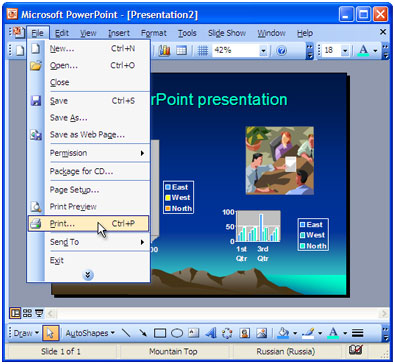
Presentation software is a tool that enables an individual to explore and generate visual demonstrations, descriptions and summaries of large amounts of information to present to others.

An example of this would include:

• Using Microsoft PowerPoint, to display information, statistics, visuals and audio about the various disabilities that exists worldwide, at an annual Special Needs Awareness Seminar.

Microsoft PowerPoint- http://www.microsoft.com/

Presentation software is presented in the form of electronic slideshows or continuous electronic pages being shown. Interested individuals are given the opportunity to utilise a variety of graphics, pictures, video clippings, internet links, music and any other forms of audio, to enhance their presentation. For the individual’s presentation to be effective, it is used in collaboration with a computer projector. At this point, the electronic slides are projected onto a wall screen, thus appearing larger.

How can presentation software assist in relation to teaching and learning?

Benefits for students

Through working with Presentation Software:

• According to, Roblyer (pg 202, 4th Edition), when students are given PowerPoint presentations to do, this allows the students, “to document and present their findings to make their learning experience more meaningful and engaged”.

• Promotes willingness and excitement to learn.

• Information are easily read and understood.

• Students are encourage to become creative and innovative in their presentations,

• Expressing their ideas becomes an easy and simple task.

• Develops the student’s ability to speak publicly.

• Widens the student’s understanding of chronological order and organisation of events.

• Students are able to match abstract objects to concrete objects or real life situations.


Benefits for teachers

Through working with Presentation Software:

• Lessons become more structured and flexible to teach.

• Teachers easily capture student’s attention and keep them focus for a longer period of time.

• Illustrate real life objects and situations by appealing to the student’s five senses.

• Facilitates note taking

• Practice and assessment screens are utilised. Teachers can present a range of animals for the students to identify for example.


To access practices and assessment screen websites, click on the following links:

Follow this link to find out how to start using PowerPoint Presentations-
http://www.youtube.com/watch?v=VUqIDs5MZxM


Follow this link to "hear me out" about some tips, when doing a PowerPoint Presentation! -

http://www.facebook.com/home.php?#!/video/video.php?v=1211851935772

or

http://s852.photobucket.com/albums/ab90/naomialways/?action=view&current=Movie.flv


REFERENCES

Book Sources:
  • Intergrating Educational Technology into Teaching: Fourth Edition:/ Aaron h Doering: Pearson Higher Education 

Internet Sources:

Saturday, January 30, 2010

An Educational Software- The Drill and Practice Software

An instructional or educational software are various computer programs that are intended exclusively to deliver or support one or a variety of learning activities. These programs carry out one or a combination of functions. These would include, drill and practice, tutorial, simulation, instructional games and problem solving.

This particular blog however, would place emphasis on the drill and practice educational software. The drill and practice is type of software that allows students to interact with example items while receiving instant feedback which be presented in various ways according to the exercise. According to (Merrill & Salisbury, 1984) the types of drill and practice are sometimes distinguished by how the program tailors the practice session to students needs. This software is functional via flash card activities, branching drills and extensive feedback activities.


Relevance and Usefulness of drill and practice software in education:


  • This software allow for the effective rehearsal students need to transfer newly learned information into long- term memory. (Merrill & Salisbury, 1984; Salisbury, 1990). This replaces the use of the many worksheets and home exercises that teachers use to encourage students to fully understand newly taught concepts.
  • Students can also prepare for school examinations since the program shows the students their weaknesses and allow them to strengthen them with practice.
  • The software also accommodates special education teachers in dealing with children, especially with learning disabilities.
  • According to (Kahn, 1998-1999):


o Students are given immediate and private feedback. This fastens the learning process.


o Those students with poor writing skills or even dislikes writing on a whole are, now motivated to practice the activity.


o The teacher also saves time, not having to correct these drill and practice activities. Thus, the teacher can now emphasize on other important issues or components of the curriculum.

Follow these links to access some drill and practice programs :–

http://www.earobics.com/
http://www.jce.divched.org/

Resourse site for teachers:- http://ww.educationworld.com

For more information on technology and education:- http://www.prenhall.com/roblyer