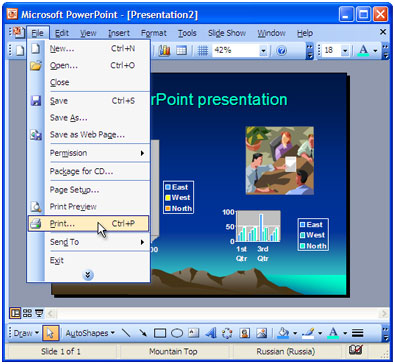
An example of this would include:
• Using Microsoft PowerPoint, to display information, statistics, visuals and audio about the various disabilities that exists worldwide, at an annual Special Needs Awareness Seminar.
Microsoft PowerPoint- http://www.microsoft.com/
Presentation software is presented in the form of electronic slideshows or continuous electronic pages being shown. Interested individuals are given the opportunity to utilise a variety of graphics, pictures, video clippings, internet links, music and any other forms of audio, to enhance their presentation. For the individual’s presentation to be effective, it is used in collaboration with a computer projector. At this point, the electronic slides are projected onto a wall screen, thus appearing larger.
How can presentation software assist in relation to teaching and learning?
Benefits for students
Through working with Presentation Software:
• According to, Roblyer (pg 202, 4th Edition), when students are given PowerPoint presentations to do, this allows the students, “to document and present their findings to make their learning experience more meaningful and engaged”.
• Promotes willingness and excitement to learn.
• Information are easily read and understood.
• Students are encourage to become creative and innovative in their presentations,
• Expressing their ideas becomes an easy and simple task.
• Develops the student’s ability to speak publicly.
• Widens the student’s understanding of chronological order and organisation of events.
• Students are able to match abstract objects to concrete objects or real life situations.
Benefits for teachers
Through working with Presentation Software:
• Lessons become more structured and flexible to teach.
• Teachers easily capture student’s attention and keep them focus for a longer period of time.
• Illustrate real life objects and situations by appealing to the student’s five senses.
• Facilitates note taking
• Practice and assessment screens are utilised. Teachers can present a range of animals for the students to identify for example.
To access practices and assessment screen websites, click on the following links:
- Upresent – http://www.codeblazer.com/
- OpenOffice.org ( free productivity software) – http://www.openoffice.org/
Follow this link to find out how to start using PowerPoint Presentations-
http://www.youtube.com/watch?v=VUqIDs5MZxM
Follow this link to "hear me out" about some tips, when doing a PowerPoint Presentation! -
http://www.facebook.com/home.php?#!/video/video.php?v=1211851935772
or
http://s852.photobucket.com/albums/ab90/naomialways/?action=view¤t=Movie.flv
REFERENCES
Book Sources:
- Intergrating Educational Technology into Teaching: Fourth Edition:/ Aaron h Doering: Pearson Higher Education
Internet Sources:
- Microsoft PowerPoint- http://www.microsoft.com/
- Upresent – http://www.codeblazer.com/
- OpenOffice.org ( free productivity software) – http://www.openoffice.org/
- http://www.youtube.com/watch?v=VUqIDs5MZxM


waoo!this is amazing,the software is very important for teachers and students.I think i should order some of this software to enhance my learning.
ReplyDeleteIn any classroom visuals are so important to the learning process. This software would certainly aid in that process. Both student and teacher would benefit from it immensely.
ReplyDeleteThanks a lot for the links, I will use them to get more info for me personally. I believe it is important to highlight key terms to students within the classroom.
ReplyDeleteA teacher's presentation skills are so important to the captivity of student interest. Definitely a software to be used by potential teachers as well as seasoned teachers.
ReplyDeleteGreat software to enhance teaching and learning in the classroom.
ReplyDelete